System Programming in Linux
This is the eighth installment in a series of posts where I share notes taken while reading an interesting book or article.
This post includes the notes made while reading the book titled “System Programming in Linux” by Stewart N. Weiss.
- Chapter 1: Core Concepts
- Chapter 2: Fundamentals of System Programming
- Chapter 3: Time, Dates, and Locales
- Chapter 4: Basic Concepts of File I/O
- Chapter 5: File I/O and Login Accounting
- Chapter 6: Overview of Filesystems and Files
- Chapter 7: The Directory Hierarchy
- Chapter 8: Introduction to Signals
- Chapter 9: Timers and Sleep Functions
- Chapter 10: Process Fundamentals
- Chapter 11: Process Creation and Termination
- Chapter 12: Introduction to Interprocess Communication
- Chapter 13: Pipes and FIFOs
- Chapter 14: Client-Server Applications and Daemons
- Chapter 15: Introduction to Threads
- Chapter 17: Alternative Methods of I/O
- Chapter 18: Terminals and Terminal I/O
Chapter 1: Core Concepts
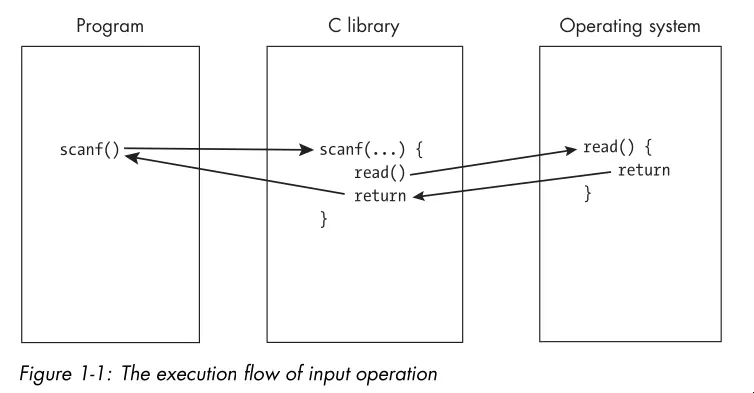
- The OS is often involved in ways users might not suspect. High level library calls actually go through the OS to accomplish tasks such as input/output to the screen:
- Resources are objects that software uses and/or modifies. A program has the privilege to access or modify any of its own resources.
- The OS protects access to a number of resources also known as system resources. These resources include hardware such as the CPU, RAM, screen displays, storage devices, and network connections.
- The OS also protects soft resources such as data structures and files.
- An API typically consists of a collection of function, type, and constant definitions and sometimes variable definitions as well. The OS API provides a means by which user programs can request services. These are system calls.
- System programs make requests for resources and services directly from the operating system or provide functions that higher-level applications can use.
- The term system program also applies to any program that can run independently of the OS and extend its functionality, even if it doesn’t make any direct calls to the API. Examples include the linker, compiler, terminal emulator, etc.
- Ideas key in the design of UNIX:
- Programmable shells.
- Users and groups.
- Privileged and unprivileged instructions.
- Environments.
- Files and the directory hierarchy.
- Device-independent input and output.
- Processes.
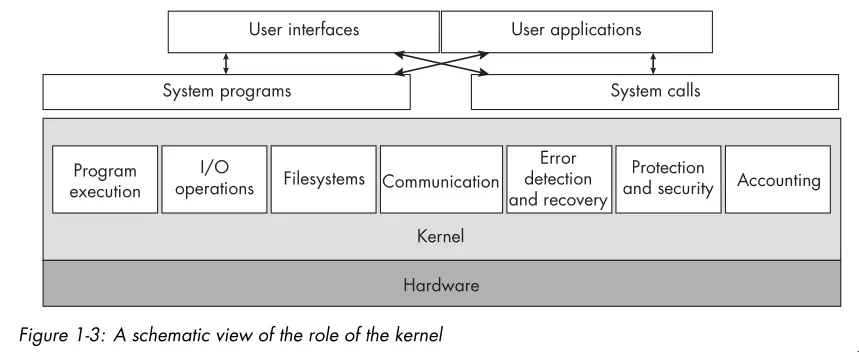
- Below is a high level view of the services a kernel provides:
- The word shell is the UNIX term for a particular type of command line interpreter.
- In modern UNIX systems, a user is any entity that can run programs and own
files. The entity need not be an actual person. For example,
root,syslog, andlpare nonperson users. - UNIX requires that the processor support two modes of operation, known as
privileged and unprivileged mode. Privileged instructions are
instructions that can alter system resources, directly or indirectly. Examples
include:
- Acquiring memory.
- Changing the system time.
- Raising the priority of a running process.
- Reading from or writing to the disk.
- Entering privileged mode.
- Only the kernel executes privileged instructions.
- When a program runs, one of the steps that the kernel takes before running the program is to make available to it an array of name-value pairs called the environment.
- The directory hierarchy and UNIX’s “everything is a file” philosophy is one of the key features that sets it apart.
- All files have a inode containing metadata (or file status information).
- An ordinary link is a directory entry that points to the inode for a file, but a symbolic link is a file whose contents are just the name of another file. The inode for a symbolic link identifies that file as a symbolic link.
- A process is an instance of a running program.
- A process contains one or more threads. In Linux, a process and a thread are much the same. The key difference is that threads within a process can share resources whereas processes do not share resources with other processes.
- The final section of the chapter gives a good overview of UNIX history as well as its relation to various standards including POSIX.
Chapter 2: Fundamentals of System Programming
- An object library is a file that bundles together, in a structured way, the compiled object code from multiple functions so that programs can call them.
- Many libraries make system calls on behalf of user programs.
- UNIX systems support two kinds of libraries: static and shared.
- A static library is a library whose code gets linked to the program statically, after the program gets compiled, to create the program executable file. In other words, the linker copies the library functions referenced by the program out of the library and inserts them into the program executable file, after which it resolves all unresolved symbols to enable jumps into and out of those functions.
- A shared library is a library whose object code is not copied into the executable, but is instead linked to the program at runtime. Runtime is the interval of time during which the program is actually running. With shared libraries, calls to functions or references to other symbols in the library get linked only when the program actually executes the calls or accesses the symbols for the first time.
- Linux systems have two dynamic linkers:
ld.soandld-linux.so. The former links and loads the old-style executable format know as a.out, and the latter links and loads executables in the modern Executable and Linking Format (ELF). - There are various binary utilities for examining the contents of libraries and
executables:
nm: Lists the symbols in an object file.ldd: Lists the shared libraries required by an executable.objdump: Displays information about object files.readelf: Displays information about ELF files.hexdump: Displays the raw byte contents of a file.od: Dumps files in octal and other formats.
- Often times, libraries call system calls on behalf of user programs. The C
library (
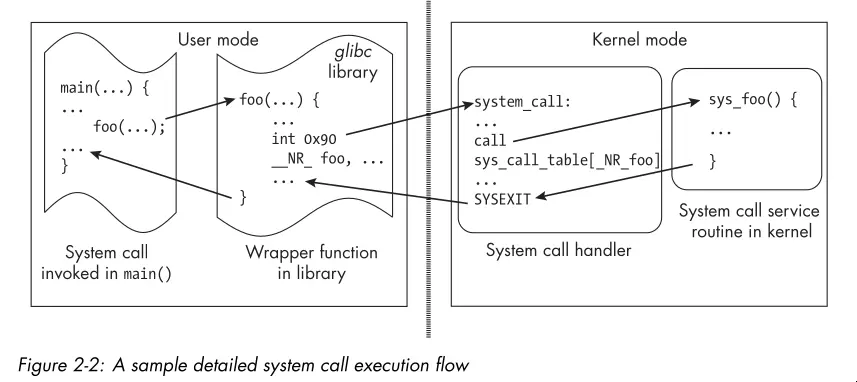
libc) is the most commonly used library for this purpose. A number of GNU C Library functions are thin wrappers around system calls. The library sets up the registers with the appropriate arguments and then invokes a special CPU instruction that switches the processor from user mode to kernel mode and jumps to a predefined location in the kernel where the system call handler resides. The schematic below illustrates this flow:
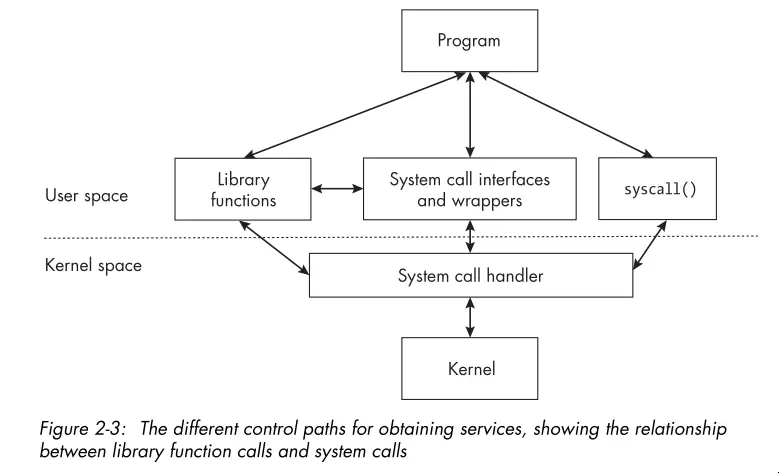
- Some system calls don’t have wrappers in the library, and for those, the
programmer has no other choice but to invoke the system call with the
syscall()function, passing the system call’s number and arguments. - The image below demonstrates the different control paths for obtaining kernel services:
- Portability refers to the degree to which your program can run on other computers with little or no modification of the code itself.
- A feature test macro is a macro designed to expose features such as constant and function prototypes in a header file when a program gets compiled.
- Locale is the definition of the subset of a user’s environment that depends on language and cultural conventions.
- When a program works correctly no matter where it’s used and performs input and output consistent with the location in which it’s run, the program has been internationalized. That means accounting for differences such as language, paper sizes, monetary units, time units, and measurement units.
- There’s a good example with explanation of how to use GNU
getopt()to parse command line options. It’s worthy of reference over the man page.
Chapter 3: Time, Dates, and Locales
- This chapter mainly demonstrates writing a program that mimics the
dateutility’s functionality. - You can modify the
TZenvironment variable to change the timezone used by time and date functions. - You can modify the
LC_ALLenvironment variable to change the locale used by time and date functions.LC_ALLoverrides all otherLC_*variables (seelocale(7)). - A XML like markup language gets used to describe locale information. These XML
files pass through a program called
localedefto generate binary locale definition files that the C library can use. - Calling
setlocale(LC_ALL, "")causes the program to use the locale specified in the user’s environment. This is the first step in internationalizing a program. - Many libc functions are locale-aware. For example,
strftime()formats date and time strings according to the current locale. Often,setlocale()is all you need to get locale-aware behavior. Otherwise you must use thelocaleconv()andnl_langinfo()functions to obtain locale-specific information.
Chapter 4: Basic Concepts of File I/O
- The chapter opens with a brief description of umasks. A umask is a set of permissions that the OS uses to restrict the default permissions assigned to newly created files and directories.
- A running process inherits the umask of its parent process or shell. A process
can change its umask with the
umask()system call. - Every process gets associated with at least one user ID. On Linux, every
process has four user IDs:
- Real user ID.
- Effective user ID.
- Saved set-user-ID.
- File system user ID.
- The kernel uses the effective user ID when it needs to determine whether to grant a process permission to access a resource.
- The kernel uses the filesystem user ID to determine access to files, but the filesystem user ID is always equal to the effective user ID.
- Normally, when you run a program, the process that’s created gets assigned an effective user ID and real user ID that are both equal to your user ID and thus the same.
- The highest-order bit in a file’s mode is the set-user-ID (SUID) bit. When the SUID bit gets set on an executable file, any process that runs that file gets assigned an effective user ID equal to the owner user ID of the file, rather than the user ID of the user who ran the program.
- A process can access only files for which it has permission to do so. This is determined by the file’s permission and the effective user ID of the running process.
- A process performs file I/O in three steps:
- Open a connection to the file to read or write.
- Perform read or writes through that connection.
- Close the connection to the file.
- The following diagram shows how the kernel uses various tables to manage the files opened by processes:
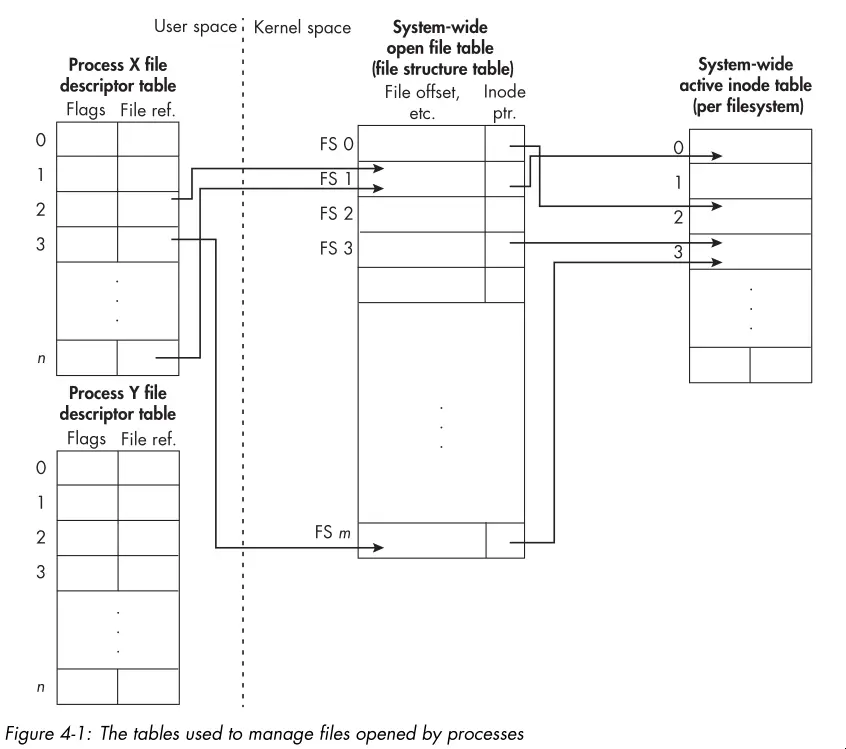
- The
open()system call opens a connection to a file and returns a nonnegative integer called a file descriptor that identifies the connection. open()takes three arguments:- The pathname of the file to open.
- Flags that determine file creation (read, write, append, create, etc).
- The file mode (permissions) to use when creating a new file. The umask of the calling process gets applied to the mode permissions.
close()always gets paired withopen()to release the file descriptor and associated resources. Handlingclose()errors is a tricky subject, see the “Errors When Closing Files” section for some tips.- The
read()system call reads data from a file into a buffer in memory. The drawing below illustrates the process:
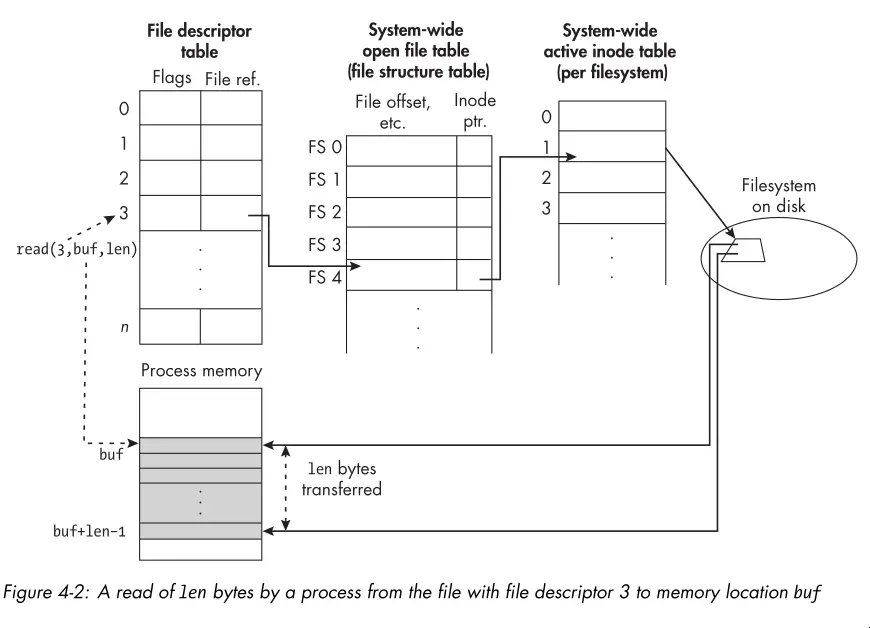
write()works similarly toread(), but in the opposite direction. One of the quirks to keep in mind is that it’s possible that a partial write occurs. In this case, the return value ofwrite()will be less than the number of bytes you requested to write.- It’s important to know that a call to
write()doesn’t guarantee that the data gets written to the physical device. The kernel uses various caching and buffering techniques to optimize I/O performance. To guarantee that data gets physically written, you must use thefsync()orfdatasync()system calls.
Chapter 5: File I/O and Login Accounting
- The
lseek()system call repositions the file offset of an open file descriptor. The file offset indicates the position in the file where the next read or write will occur. - The
lseek()system call takes three arguments:- The file descriptor of the open file.
- The offset (in bytes) to which to set the file offset.
- The reference point from which to set the offset. This can be the beginning of the file, the current file offset, or the end of the file.
- Files can have holes. When reading from a hole, the kernel returns NULL bytes. When writing to a hole, the kernel allocates disk space as needed.
- You can create a hole in a file by using
lseek()to set the file offset beyond the end of the file and then writing data at that position. - A file with holes is a sparse file. The filesystem doesn’t allocate disk
space for the holes, which can save disk space. That said, tools like
lswill report the apparent size of the file, which includes the holes, rather than the actual disk space used. Other tools likedureport the actual disk space used. Worth noting that filesystems allocate disk space in blocks. So a small file with a large hole in the middle may for example end up using two 4KB blocks on disk having then an actual size of 8KB.
Chapter 6: Overview of Filesystems and Files
- Filesystems are the framework for storing files. They organize the entire collection of files, providing both the infrastructure and an interface for accessing them.
- The kernel interacts with disks through device drivers. A device driver is a collection of kernel functions that make a device respond to the various system calls by communicating with the device.
- Below is a graphic showing the layering of interfaces in a typical Linux system:
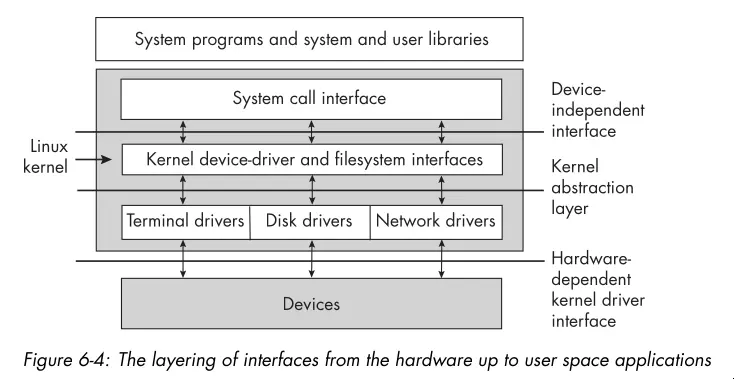
- Disk partitions or logical disks are subdivisions of physical disks that the OS treats as separate disks.
- Benefits of partitioning a disk includes:
- More control of file security.
- More efficient use of the disk.
- More efficient operation.
- Selective backup procedures.
- Improved failure recovery.
- Reliability.
- The biggest disadvantage of partitioning a disk is that partitions can’t be increased in size.
- Linux supports various filesystems (see
filesystems(5)). Theextfilesystem and its variants (ext2,ext3,ext4) are the most commonly used.- Ext2: The high-performance disk filesystem used by Linux for fixed disks as well as removable media.
- Ext3: An enhanced version of ext2 that supports journaling.
- Ext4: A performance upgrade of the Ext3 filesystem.
- A modern partition layout may look like this:
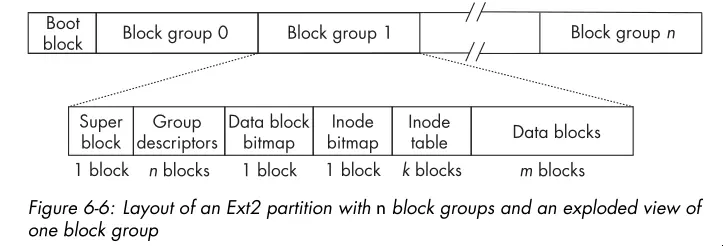
- The superblock contains parametric information about the filesystem such as how many inodes it has, the total number of blocks, the block size, the number of reserved and unused blocks, timestamps of various kinds, various flags indicating whether it’s read-only or locked, information about the system’s mount status, and much more.
- The group descriptors store information about the group such as the address of the starting block of each other component of the block group, how many blocks in the group are in use, how many are free, and so on.
- The data block bitmap is a bitmap with 1 bit for every data block in that group. If the block is in use, the bit is 1, and if free, the bit is 0.
- The inode bitmaps serves a similar purpose for inodes as the data block bitmap does for data blocks. It contains a bit for each inode in the inode table, which indicates whether it’s in use or free.
- The inode table stores all inodes for files whose data is in the block group.
- A filesystem has to provide methods that the kernel can call so that it can provide its services to user programs. Such methods include functions to create files, to read and write data, to retrieve file properties, to move the file offset, and so on.
- Lets think about the steps the kernel takes to create a file (ignoring error
handling):
- It checks whether the filename is valid and whether the filename doesn’t exist already in the given directory.
- It checks whether the process has permission to create a file in this directory.
- It acquires a new inode for the file.
- It fills in the inode with the file status.
- It creates a directory entry in the directory with the inode number and filename.
- Writing data requires:
- Allocating data blocks for the file and storing the file data into these blocks.
- Recording the addresses of the data blocks in the inode.
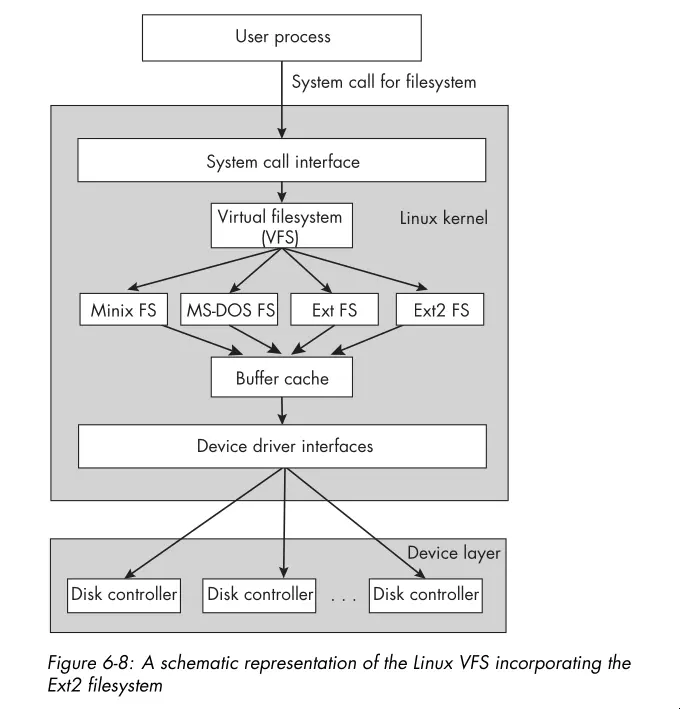
- Linux has a Virtual Filesystem (VFS) layer which defines a set of functions that every filesystem must implement. This interface includes operations associated with three kinds of objects: filesystems, inodes, and open files. Here’s a schematic view of the VFS layer:
- The Linux kernel provides a few system calls for obtaining the metadata
associated to files, including
stat(),lstat(), andstatx(). It also provides a separate set of calls for accessing filesystem metadata, includingstatfs(), and the C library provides the POSIX-conformingstatvfs().
Chapter 7: The Directory Hierarchy
- A directory consists of a set of
(inode number, filename)pairs called links. - Directories are never empty because every directory has two unique entries:
.and... - You create and modify directories only by specific system calls, unlike
regular files, which you create by calling
open()andcreat(). - You can traverse directories by first getting a pointer to a directory stream
via
opendir(), then reading entries from the stream withreaddir(). The entries themselves only guarantee the presence of the entry filename and inode number. Seereaddir(3)for more details on the other entries. - The
scandir()function reads the contents of a directory into an array of pointers todirentstructures. You provide a optional filter function to select which entries to include and a optional comparison function to sort the entries. It’s handy for filtering and sorting a single directory level. - When you mount a filesystem to a particular directory, the original contents of that directory become inaccessible until the filesystem gets unmounted.
- A process can recognize when a directory
diris a mount point because the device ID of the directory’s parent, say,parentis different from that ofdir. This is becausediris the root of the mounted filesystem andparentis a node on the filesystem to which it’s attached. - Due to mounting, to uniquely identify a file, you must know both the inode number and the device ID. This is because different filesystems can have files with the same inode number.
- The
nftw()function performs a depth-first traversal of a directory tree, starting at the specified pathname. It calls a user-defined callback function for each file and directory it encounters. This is useful for performing operations on all files in a directory tree, such as calculating the total size of files or searching for files with specific attributes. It has options for controlling the traversal behavior as well. - There’s also an
ftsfamily of functions for traversing directory trees. They provide more control and flexibility thannftw(). The API is arguably worse. That said, GNU utilities likegrep,chmod, andrmuseftsfunctions for directory traversal.
Chapter 8: Introduction to Signals
- Signals serve as a form of notification about some event or condition of importance that’s sent to a recipient.
- In UNIX, signals are essentially software interrupts; they’re empty messages delivered to a process that interrupt its normal instruction cycle.
- Many signals are like hardware interrupts in that they can occur at any time, independent of what a process is doing when they arrive. The kernel is almost always the source of the signal.
- Sometimes, one process can send a signal to another, and a process can send a signal to itself.
- Signals carry with them no information other than the signal type. The signal
type is an integer that identifies the signal. For example,
SIGINThas a signal number of 2, andSIGTERMhas a signal number of 15. - There are a number of sources of signals, including:
- User
- Kernel
- Hardware Exceptions
- Other Processes
- A process that’s sent a signal may not be executing at the time the signal got sent. Until it resumes execution and the signal is actually delivered to it, the signal is pending for that process.
- The kernel will never deliver a duplicate signal to a process’s signal queue. You can think of the signal queue as a set of bits.
- Processes also have the ability to temporarily block certain types of signals by defining a signal mask.
- A signal is delivered to a process when it responds to the signal in one of
the following ways:
- The process explicitly ignores the signal. You can’t ignore some signals.
- The process executes a signal handler.
- The process accepts the default action associated with the signal. These
include:
- Terminate
- Ignore
- Stop
- Core Dump
- Continue
signal(7)andsignal.h(7posix)provide all the information you would need about signals on any Linux system.- A processes signal disposition is the set of actions that the process takes
in response to signals. The signal disposition for a particular signal can be
changed by the process with the
sigaction()system call. - There’s also an older system call:
signal(2). You shouldn’t use it. That said, if you encounter it in the wild, beware that its semantics can vary between BSD and System V UNIX systems. In System V, the signal handler gets reset to the default after the first signal gets delivered, but in BSD, the signal handler remains in place until explicitly changed. You can toggle between the two via feature test macros. - You can interrupt a system call via a signal. Some system calls get restarted
after the signal handler returns, but others will not (for example,
sleep). You can read more insignal(7). - You can use CLI utilities like
killandpkillto send processes signals. Despite the name, by default,killsends theSIGTERMsignal. You can send any signal you find in the man pages with the-soption. - You can send signals to other processes or process groups programmatically
using
kill(3). Only those processes with a matching real or effective user ID can send signals to a process. Thekill()function takes two arguments: the PID of the target process and the signal number to send. The first argument tokill()dictates its behavior. See the man page for examples. - You can also raise signals from within a process with the
raise()function. This is equivalent to sending a signal to yourself withkill(). - Blocking a signal means informing the kernel to hold onto that signal for a
short time until you’re ready for it. You can view signal blocking as putting
as short-term hold on signal delivery while your program performs some actions
that you don’t want interrupted. If you want the signal blocked for a long
time, it would be better to use
signal()to set its disposition toSIG_IGN. - You can use the
sigprocmask()system call to block and unblock signals. These work in conjunction with thesigset_tdata type. See thesigsetopsman page for more info. - Blocked signals are not queued. If you block a signal and it’s generated multiple times, only one instance of it gets delivered when that signal is unblocked.
- POSIX requires that when a signal gets unblocked with a call to
sigprocmask(), if it’s ending, the signal gets delivered to the process immediately, before thesigprocmask()call returns. - If you want to atomically update the signal mask of the process and suspend it
until a signal that terminates or triggers a registered handler gets
delivered, use the
sigsuspend()system call. The expected way to usesigsuspend()is in conjunction withsigprocmask(). The program blocks signals, executes a critical section of code, and callssigsuspend()to unblock the signals and wait for delivery of a signal. This still requires writing a signal handler for the signals. - The
sigwait()andsigwaitinfo()system calls are useful when you want to write programs that respond to specific signals in a synchronous way, meaning without writing signal handlers that run whenever the signals get sent, but instead responding to them within the program’s ordinary functions. - The
sigaction()system call replaces the use ofsignal()for installing signal handlers and controlling their behavior. The programmer specifies how the handler will respond when multiple signals get sent to a program while it’s executing a signal handler. - If you handle a synchronous signal, your handler must terminate the program or
raise
SIGTERMto terminate the program. Otherwise, the instruction that caused the signal gets re-executed after the handler returns creating a loop. - The
signumanducontext_targuments of thesigaction()signal handler are often not used. Thesiginfo_tstructure contains information about the signal and its source. What fields it contains depends on the signal type and source. For more information, consult thesigactionman page or POSIX.1-2024 specification. - The section describing the behaviors of the
sa_flagsfield is worth re-reading if you’re programming withsigaction(). - See the
signal-safetyman page for more information about which function are safe inside signal handlers.
Chapter 9: Timers and Sleep Functions
- Most computers have a designated hardware clock called the real-time clock (RTC) that keeps wall clock time. Among the RTCs, there’s one that’s backed up by a battery while the computer is off or in a low power state so that it keeps its time.
- Many computers also have a hardware device called a programmable interval timer (PIT). The PIT issues an interrupt, called a timer interrupt, whenever it times out. The PIT is a hardware timer that continues to generate interrupts at the same rate as long as the machine is on. Linux kernels typically program the PIT to issue interrupts about once every millisecond, a frequency of 1,000 Hz.
- The interval between adjacent PIT interrupts is a tick.
- A third type of timekeeping device is the time stamp counter. Linux systems sometimes use this hardware counter for higher-precision timing. The oscillator in this device has a much higher frequency than the PIT.
- A fourth type of timer is the High Precision Event Timer (HPET). These timers container internal counters that they update at least once every 10 microseconds, meaning a frequency of at least 100 KHz.
- The system clock is a software clock, which means that time gets recorded and updated entirely by software. On reboots, the kernel initializes the system clock by either reading time from the RTC or, if it has a network connection, by getting it from a network time service such as an NTP server. Once initialized, the system clock stores the time since the Epoch. The system clock gets updated every time it receives an interrupt from the PIT.
- A jiffy is the unit of time between adjacent PIT interrupts. The resolution of software timers depends on the value of a jiffy. A timer can’t be more accurate than the length of a jiffy. On some newer systems, timer system calls aren’t based on jiffies but instead on high-resolution timers such as the HPETs.
- In the world of high-resolution sleep functions you have
nanosleep()andclock_nanosleep(). The latter is the preferred function since you can specify the clock and set timers based on absolute time. The ability to set absolute timers is important to avoid the problem of timer drift. Seenanosleep(2)for more information on timer drift. - The
alarm()system call is a simple timer that sends theSIGALRMsignal to the process after a specified number of seconds have elapsed. It’s not a high resolution timer, and it’s not suitable for most timing purposes. - An interval timer is a timer that expires at regular intervals until it’s
explicitly canceled. The
setitimer()system call provides interval timers. The modern timer API usestimer_gettime(),timer_settime(), and friends. - You’ll have to read the section in this book or the man pages to understand the interval timer API. They overload many of the parameters.
- Timer overruns are timer expiration event notifications that get generated
but never delivered or accepted by the process. Kernel scheduling or other
system activities can cause this to happen. You can get a count of overruns
with
timer_getoverrun(). - POSIX defines at least eight real time signals that you can use for timer
expiration notifications. In general, they range from
SIGRTMINtoSIGRTMAX. These signals are different than the standard signals in that they get queued by the kernel and lower valued signals have higher priority.
Chapter 10: Process Fundamentals
- Modern UNIX systems introduced the concept of a process group as an abstraction of a job. The motivation for this feature is to simplify the way in which a pipeline gets terminated with a signal.
- There are system calls for getting/setting a process’s process group ID. See
man
setpgid(2)andgetpgid(2). - A process group has a leader process whose PID is the same as the process group ID. The leader process is the first process in the group. When a process creates a child process, the child process inherits the process group ID of its parent, so it becomes a member of the same process group.
- A session or login session is the collection of all processes created directly or indirectly when you log in. Formally, a session is a collection of process groups, and every process group belongs to exactly one session. Each process has a unique session ID (SID) that identifies the session to which it belongs.
- The primary purpose of a session is to organize processes around their controlling terminals. The controlling terminal for a process is the terminal that delivers signals to the process when the user enters certain key combinations or sequences. When a user logs in, the kernel creates a session, places all processes and process groups of that user into the session, and links the session to the terminal as its controlling terminal.
- A daemon is a process that has no controlling terminal and usually runs until the computer gets powered off.
- You can changed a processes’ session ID with
setsid(). - Processes fall into one of two categories: foreground or background. The idea is that foreground processes get connected to the terminal, whereas background processes aren’t. Every session can have multiple process groups, but at most one of them can be a foreground group; the others must be in the background.
- Foreground processes can read input from the terminal and receive signals sent
via the keyboard directly. Background processes can’t read input from the
terminal and don’t receive signals unless sent via
kill. - There’s a brief section on the ELF format. You should checkout the Linkers and Loaders notes for more information on the ELF format and how executables get loaded.
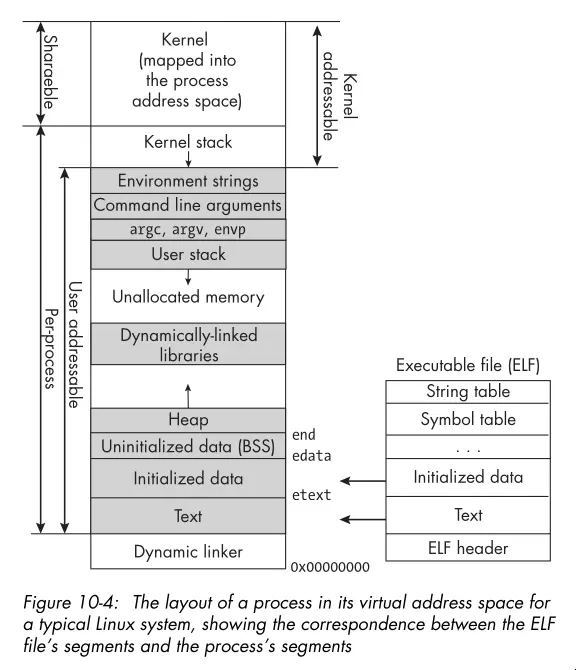
- Here’s the layout of a process in its virtual address space:
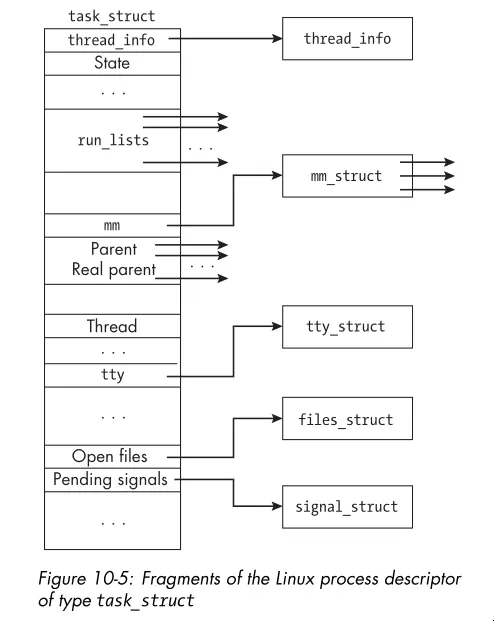
- The Linux process descriptor is a kernel data structure that contains all
the information about a process that the kernel needs to manage it. The
task_structstructure represents the process descriptor in Linux. Here’s a graphic showing just a handful of the fields:
- You can’t access most of the information in the process descriptor from user space through the system call interface.
/procis pseudo-filesystem that provides an interface to kernel data structures. It contains a directory for each running process, named by its PID, and within each process directory, there are files that provide information about the process. Some useful files include:- cmdline: The complete command line for the process.
- comm: The executable file that the process is executing.
- cwd: A symbolic link to the process’s current working directory.
- environ: The initial environment set when the program got started. It
might have changed after program start. The strings are
NULLseparated. - exe: A symbolic link containing the pathname to the executed command.
- fd: A subdirectory containing links to each open file descriptor.
- io: Input/output statistics for the process.
- maps: The currently mapped memory regions and their access permissions. This shows information such as where the heap and stack and linked libraries get loaded.
- stat: Status information about the process. This file isn’t as easily
read as status but gets used by
ps. - statm: Memory usage, measured in pages.
- status: Similar status information to that in stat, but easier to read.
Chapter 11: Process Creation and Termination
- The
fork()system call creates a new process by duplicating the calling process. The child process gets an exact copy of the parent’s memory, file descriptors, and other resources, but it has a unique PID and its own execution context. - Some things that don’t carry over to the child process include:
- The set of pending signals.
- Any per-process timers.
- The child’s PID is unique and different from any active PGID.
- Message queues, semaphores, and shared memory segments are not inherited by the child process.
- Open file descriptors get shared between the parent and child. The child’s descriptor is even at the same offset. If the child moves the offset or the parent moves it, the other process sees the change! You need to synchronize access to avoid unexpected behavior. This leads to a form of IPC.
- You want to use
fork()in your programs.vfork()is a variant offork()that’s deprecated and more of historical note.clone()and its variants are Linux specific.clone()is a more flexible system call that you use to control which resources get shared between the parent and child processes. exit()terminates the calling process and returns an exit status to the parent process. Whenexit()gets called, these events take place in order:- All functions registered to run with
atexit()run in the reverse order in which they got registered. - All file streams opened through the Standard I/O Library get flushed and closed.
- The kernel’s
_exit()function gets called, passing the status argument ofexit()to it.
- All functions registered to run with
- Child processes inherit the exit functions registered by the parent when
fork()created them. - The
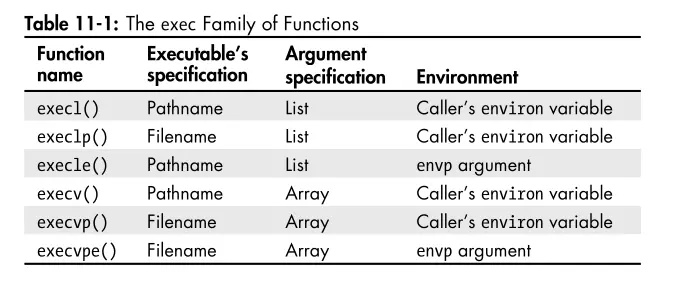
execve()system call replaces the current process image with a new process image specified by the pathname argument. Thevestands for vector because theargvandenvparguments are vectors of strings. The other exec functions do the same thing but provide slightly different interfaces for convenience. The table below summarizes the differences:
- The
wait()system call suspends the calling process until one of its child processes terminates. It returns the PID of the terminated child and stores the child’s exit status in the location pointed to by thestatusargument. - The
waitpid()system call is a more flexible version ofwait(). You specify which child process to wait for and provide options for controlling the behavior of the waiting process. Worth reading the man page for more details. - The
W*()macros tell you the exit status returned bywait()andwaitpid(). You can determine whether the child process terminated normally or abnormally, and if it terminated normally, what its exit status was. If it terminated abnormally, you can determine whether it was due to a signal and which signal caused the termination. - Below is an image illustrating the format of the exit status:
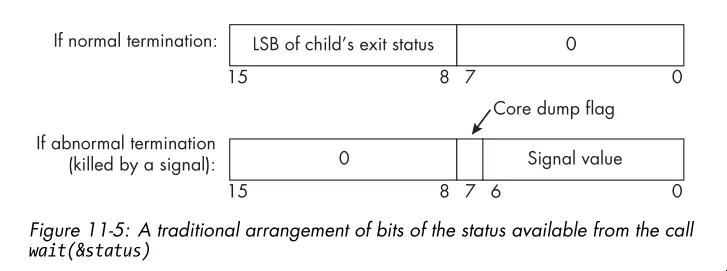
- The
system()function is a convenient way to execute a shell command from a C program. It takes a string argument that contains the command to execute. Thesystem()function creates a child process, invokes the shell to execute the command, and waits for the command to complete before returning. Check out the man page. In general, you should avoid usingsystem()in production code because it can be a security risk.
Chapter 12: Introduction to Interprocess Communication
- Data gets exchanged between processes either through a shared storage medium or by transferring it through some channel that the operating system manages.
- Shared memory is one form of IPC. The memory region used for sharing is in the processes’ address spaces. The kernel is not involved in the transfer of data to and from this memory.
- There’s also data transfer IPC. The kernel gets involved in the transfer of data. Think pipes, sockets, and message queues.
- See the graphic below for a illustration of the differences between the two forms of IPC:
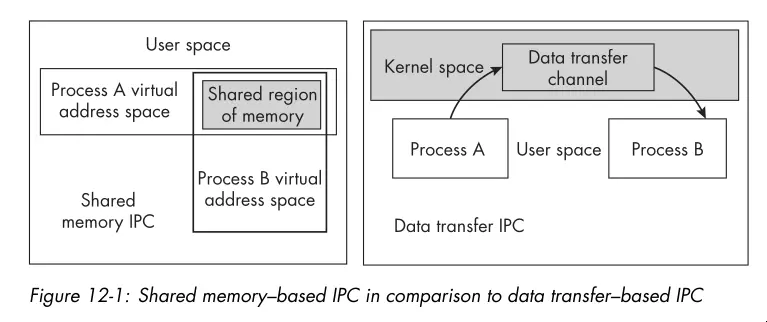
- Unlike shared memory IPC, data transfer IPC methods provide the mutual exclusion needed to prevent race conditions, freeing the programmer from having to prevent them explicitly. That said, data transfer IPC methods are slower than shared memory IPC.
- Message queues support the reading and writing of messages. Only one message gets read at a time. When a message gets read, it’s removed from the queue. Message queues are not the same as the FIFO IPC mechanism!
- Semaphores are another IPC method. They’re usually used for synchronization
between processes. You can increment a semaphore
sem_post()and decrement itsem_wait(). The operations are atomic. If one process attempts to decrement a semaphore whose value is zero, it gets blocked until another process increments it. - You can get an overview of the POSIX shared memory interface by reading
shm_overview(7). A shared memory object encapsulates the metadata associated with the memory region created by the kernel. On Linux, it’s created in an in-memorytmpfsfilesystem and has a name visible in the/dev/shmdirectory. - If writing a program in C/C++ that will use the POSIX shared memory API, give the “Shared Memory API” section a read.
- When working with shared memory, be careful not to store pointers to memory in one or more processes’ address space. Those addresses are invalid when dereferenced by the other processes. Instead, you should use offsets to store the locations of data in the shared memory region.
- You must protect access to shared memory with some form of synchronization, such as semaphores to prevent race conditions if that region of memory is both read and written.
- The
sem_overview(7)man page gives a overview of POSIX semaphores. There are two types of POSIX semaphores: named and unnamed:- Names Semaphore: Has a name of the form /name similar to a shared
memory region name. Two processes operate on the same named semaphore by
passing that name to the
sem_open()function. - Unnamed Semaphore: Has no name. You must create it in an address space common to all processes or threads that operate on it. This means that, for processes, it must be in a shared memory object shared by the processes.
- Names Semaphore: Has a name of the form /name similar to a shared
memory region name. Two processes operate on the same named semaphore by
passing that name to the
- The functions supported by named and unnamed semaphores look like this. Not
shown are the
wait()andpost()functions which are common to both.
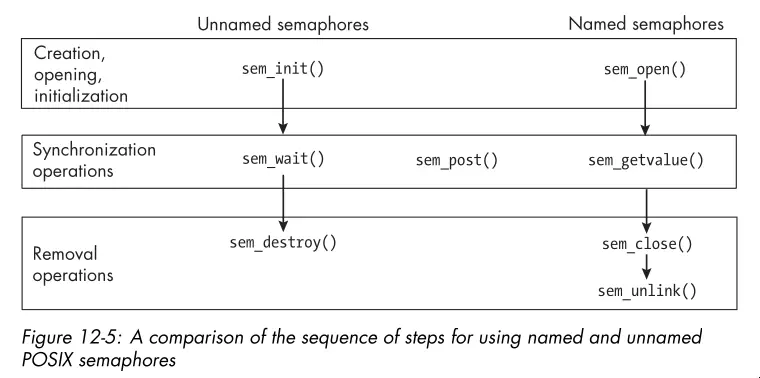
- You’ll probably see unnamed semaphores more often since if two processes are synchronizing access to a shared memory region, it makes sense to put the unnamed semaphore in that region.
- The
mq_overview(7)man page contains a good summary of POSIX message queues and refers you to the man pages that describe how to use them. - POSIX message queues are not necessarily first-in-first-out queues because each message is a assigned a priority. It’s a priority queue.
- Message queues are handy for communicating data synchronously or in contexts where polling is okay. Asynchronous communication is possible with message queues, but it’s more complicated to set up. The asynchronous side of the API alerts a process that a first message has arrived in the message queue. It’s not meant for alerting a process of every message that arrives.
Chapter 13: Pipes and FIFOs
- FIFOs is the POSIX term for a named pipe. A typical pipe requires that the processes on both ends of the pipe share a common ancestor. A FIFO has no such requirement.
- A pipe is a unidirectional data channel for interprocess communication. Here
are the key features of a pipes/FIFOs:
- Creating a pipe returns two file descriptors.
- Pipes transmit byte streams.
- Pipes preserve the order of the data written to them.
- Reads from the pipe drain the pipe.
- Reads are blocking by default.
- Pipes have limited capacity.
- Writes of at most
PIPE_BUFbytes are atomic.
- The read and write semantics on pipes get complicated. See the tables on page 652 for a clear summary of the possible scenarios.
- The
dup()system call duplicates an existing file descriptor using the lowest numbered unused file descriptor. Here’s a snippet illustrating the idea:
int pipefd[2];
if ( pipe(pipefd) == -1 )
// Handle error and exit.
--snip--
close(1);
/* Close descriptor 1, making it lowest unused descriptor.*/
dup(pipefd[1]); /* Now descriptor 1 points to the write end of the pipe. */
close(pipefd[1]); /* Close the pipe's write end descriptor.
*/- The code has a problem in that a race condition exists. The problem is that if
a program has any signal handlers and a signal arrives after the closing of
descriptor 1 but before the call to
dup(), the signal handler might open a new file descriptor, using slot 1, anddup()will not duplicate the descriptor into standard output. This race condition is the reason whydup2()exists.dup2(fd, fdtoreplace)atomically performs the two steps of closingfdtoreplaceand replacing it withfd. - Named pipes are unlike unnamed pipes in that:
- They exist as directory entries in the file system and therefore have associated permissions and ownership.
- They get used by processes that are not related to each other.
- They get created and deleted at the shell level or through the system API.
Chapter 14: Client-Server Applications and Daemons
- The word daemon is from Greek mythology and refers to a lesser god that did helpful tasks for the people it protected.
- A daemon is a process that runs in the background without a controlling terminal.
- A daemon can use the syslog logging service to log its messages.
- The important part of daemons is that they execute without an associated terminal or login shell, usually waiting for an event to occur.
- Daemon names often but not always end in “d.”
- These are the steps a process must take to turn itself into a daemon:
- Putting itself in the background.
- Making itself a session leader.
- Registering its intent to ignore
SIGHUP. - Executing its code as a new child of the existing process.
- Changing the current working directory to
/. - Clearing the
umask. - Closing any open file descriptors.
- An iterative server is a server that services the requests from its clients in an iterative fashion, meaning one after another.
- A concurrent server is one that forks a separate process (or perhaps a thread) to handle each request.
Chapter 15: Introduction to Threads
- In modern Linux, each user level thread, meaning threads the program creates, get assigned to a kernel scheduling entity called a lightweight process.
- The functions in the pthreads API fall into one of four groups:
- Thread Management
- Mutexes
- Condition Variables
- Synchronization
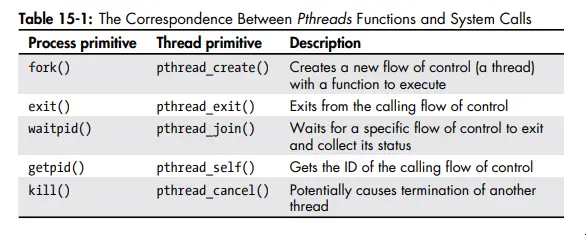
- Here’s the correspondence between pthreads functions and system calls:
- Worth taking a second look at page 712 to see what resources are and are not shared between threads.
- You don’t always have to join threads, you can also detach them. You can’t
join detached threads, and their resources get automatically released when
they terminate. You can detach a thread with
pthread_detach()or by setting the thread’s detach state toPTHREAD_CREATE_DETACHEDwhen you create it withpthread_attr_setdetachstate(). - Exceeding the default stack limit of a thread is possible even on modern
machines. Threads stacks are usually no more than 8KB by default. If the stack
limit gets exceeded, the program will terminate, possibly with corrupted data.
You can explicitly allocate more stack space for a thread with
pthread_attr_setstacksize(). Or you can allocate on the heap. - The interaction between signals and threads is a mess. See page 727 for an explanation with examples.
Chapter 17: Alternative Methods of I/O
- You can poll most resources by setting the
O_NONBLOCKflag on the file descriptor. - Non-blocking I/O is a form of polling. Whether the read/write operation succeeds, you’re making many system calls and often wasting CPU cycles.
- Worth noting for the
O_NONBLOCKflag, this flag has no effect for regular files and block devices; that is, I/O operations will block when device activity occurs, regardless of whether you setO_NONBLOCK. - In signal driven I/O, a process informs that kernel in advance that it wants to get a signal whenever it’s possible to read or write a given open file descriptor, and it establishes a signal handler to catch this signal.
- Signal driven I/O is a edge triggered notification method enabled by setting
the
O_ASYNCflag on the file descriptor. It’s only available in Linux and BSD and so isn’t portable. This is arguably not async I/O either because you at best get a notification that data is ready but the data has yet to be transferred to the process address space. - POSIX AIO provides a API for async communications that mirrors the usual read,
write, etc API (see
aio(7)). The POSIX AIO implementation lives in glibc. The implementation doesn’t scale well since each operation spawns a new user level thread. - You can receive AIO completion notifications via signals or threads. Additionally, the AIO API includes functions for suspending and cancelling AIO operations.
- I/O multiplexing is a service provided by the kernel allowing processes to
monitor multiple file descriptors for possible I/O activity. This service
associates with the
select(),poll(), andepoll()system calls.epoll()is Linux only and is the most efficient of the three albeit hardest to use. The book describesselect()in detail. - Read the man pages and also
select_tut(2)for more information and examples.
Chapter 18: Terminals and Terminal I/O
- People don’t use actual terminal devices anymore; instead, they use software-emulated terminals on bitmapped graphical displays.
- Terminal canonical mode is the default mode of terminal input processing. In this mode, the terminal driver provides line editing and other features. The terminal driver buffers gather input until a newline character gets sent, at which point it makes the input available to the reading process.
- Programs like Emacs, vi, and less put the terminal into a noncanonical mode called raw mode, in which the terminal passes all input to the process with no processing.
- The behavior of the terminal gets controlled entirely by a software component
called a terminal driver. A terminal driver consists of two subcomponents:
- A terminal device driver
- A line discipline
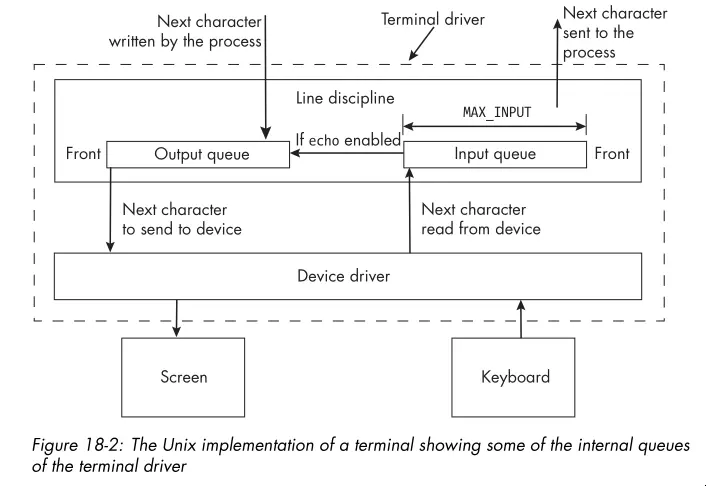
- The terminal device driver’s main function is to transfer characters to and from the terminal device; it’s the software that talks directly with the physical terminal or the terminal emulator and the line discipline at the other.
- For a terminal, the line discipline is the software that does the processing of input and output. It manages several queues, including an input queue and an output queue for the terminal driver.
- The image below shows the relationship between the terminal device driver and the line discipline:
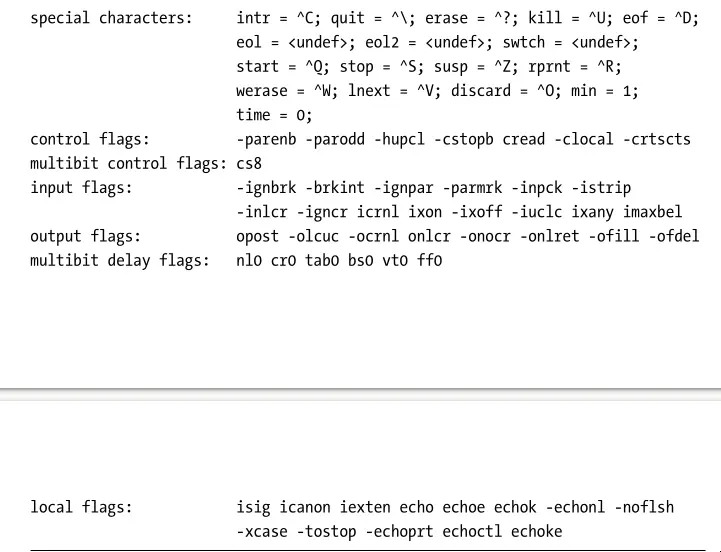
- The
sttycommand can both display and alter terminal characteristics. With the-aoption, you can see most of the settings for the terminal connected to the shell in which you invoked the command. - There are several categories of terminal attributes:
- Special Characters: Characters that get used by the driver to cause
specific actions to take place, such as sending signals to the process or
erasing characters or words or lines. Examples include
CTRL-Cfor sendingSIGINTandCTRL-Dfor sending an end-of-file indication. - Special Settings: Variables that control the terminal in general, such
as its input and output speeds and dimensions. These include the
rows,cols,min, andtimevalues. - Input Settings: Operations that process characters coming from the terminal. This includes changing their case, converting carriage returns to newlines, and ignoring various characters like breaks and carriage returns.
- Output Settings: Operations that process characters sent to the terminal. Output operations include replacing tab characters with the appropriate number of spaces, converting newlines to carriage returns, carriage returns to newlines, and changing case.
- Local Settings: Operations that control how the driver stores and processes characters internally. For example, echo is a local operation, as is processing erase and line-kill characters.
- Combination Settings: Combinations of various settings that define modes
such as
cookedmode,rawmode, andsanemode.
- Special Characters: Characters that get used by the driver to cause
specific actions to take place, such as sending signals to the process or
erasing characters or words or lines. Examples include
- Input switch names always begin with an
iand output switch names begin witho. - Below is a capture showing examples of the different terminal attributes
reported by
stty -a:
- See
termios(3)for more information about the terminal attributes and how to manipulate them programmatically.